Workspaces for people and agents, from parts that already exist
Working with agents made it fun to pick up ideas I had put aside. Spinbox grew out of wanting somewhere to try them.

Working with agents has had an unexpected effect on my backlog. I keep going back to ideas I’d put aside over the last few years because trying them would take too much time. Now I can follow a couple of them at once and find out whether there’s anything there. I’m enjoying that enough that I wanted the experiments to keep running when I closed the laptop.
Spinbox started as a place for that work. A workspace is a machine with your project ready on it, where you can work yourself or let an agent try something. I wanted to give each experiment room of its own, and give my laptop less to do. Think of the Construct in The Matrix, the empty space where they load the equipment and simulations they need. A workspace has some of that appeal for me. Bring in the tools, try an idea, and have somewhere to start again. The scene captures it better than a list of features.
My first attempt was to run everything at home.
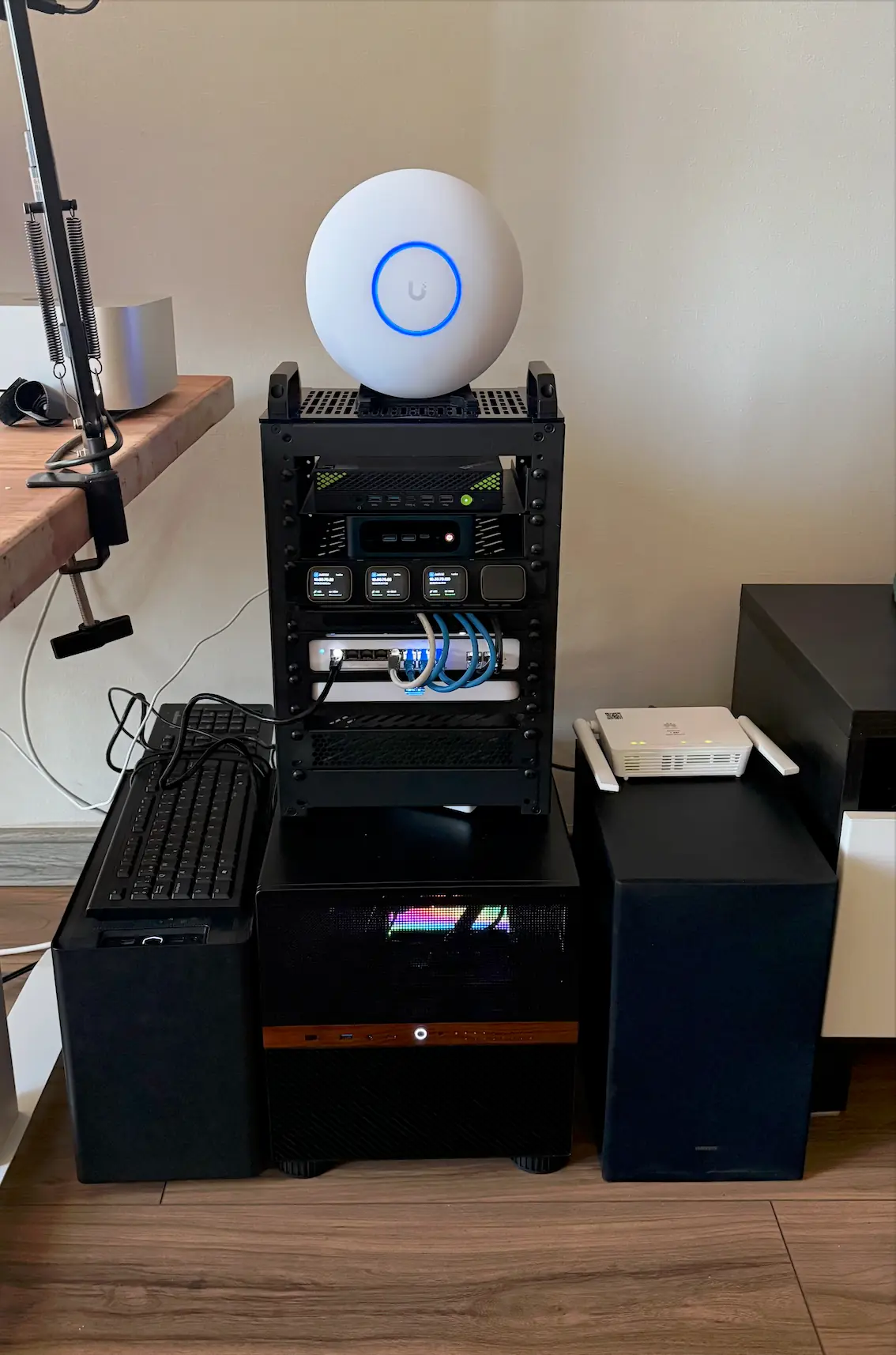
Soon there were more machines in the rack than I had planned for, with RustFS for object storage and Tailscale to reach them when I was away. I’d planned the capacity, not the work of connecting it all: firewall rules, DNS and certificates to keep in order, and more routing every time I wanted to expose a service.
I also had JetKVMs connected through Tailscale, so I could see a machine’s screen and use its keyboard remotely even when I couldn’t get a shell. That helped until one machine froze badly enough that even Ctrl-Alt-Delete did nothing. I could look at it, but I couldn’t turn it off and on again. JetKVM has an ATX accessory that controls the physical power and reset buttons. When I bought mine, I didn’t know it existed, let alone how much I’d miss it. I found out in San Francisco, at the AI Engineer Code Summit, after more than a day unable to use the machine, when I had to ask my brother Francisco to go and restart it. The accessory would have let me do that myself.
I liked putting it all together. Then the power supply died in the machine that ran my CI jobs. Even with a rack full of machines, I had nowhere else to run them. Replacing the parts took a couple of weeks.
That gave me time to think about what I was building. Keeping the rack running was starting to take time away from the experiments I’d built it for. And moving the same setup somewhere else would still leave questions I hadn’t answered. How would the storage grow? Where would the jobs go when a machine failed? What if a few other people wanted to use this too?
Those questions started taking Spinbox beyond my own lab.
One rule
For Spinbox, I settled on a QEMU virtual machine for each workspace, and on one rule: if Linux or QEMU already does it, use that. Owning the layers gives you the behavior; it also gives you the work of keeping them running. After the rack, I wanted that time on the glue.
Take the disk: a chain of files, each pointing at the one below, and only the top one is ever written. It’s how a container image works with overlayfs, the trick at the heart of Docker and containerd, one level down, with whole disks. It’s what gives a snapshot of a running machine’s disk, a fork that copies nothing, and images with no registry to babysit at three in the morning. A disk is a chain tells the whole story.
I’ve also managed to give myself a fairly memorable lesson in reinventing the wheel. In July I decided qcow2 wasn’t good enough and I needed a storage engine of my own. It ended up a quilombo (a glorious mess): it served a disk full of zeros and told nobody. That story comes later, and I come out of it looking about as good as you’d expect.
The network I learned the hard way. The first prototype used CNI, the plugin system containerd and Kubernetes use, where a network is a chain of separate programs and your container gets whatever the chain adds up to. It worked, but to answer can workspace A reach workspace B? I had to read three plugins and the host’s settings, and I was never quite sure. So it went. Today every machine gets the same IP address. Yes, the same one. Each lives in a small network of its own and never sees a neighbor, so there’s nothing to hand out and nothing to clash: no DHCP, no address management, and I don’t miss them one bit.
$ spin exec blog-captures -- ip -br addr show eth0
eth0             UP             169.254.68.6/30
$ spin exec blog-captures-b -- ip -br addr show eth0
eth0 UP 169.254.68.6/30Room to experiment
A workspace has to let you change things. You’re root in it, so an experiment can include installing packages or changing the system itself. Giving an agent that freedom makes the boundary around the workspace especially important.
The machine has its own kernel. Around it, the QEMU process runs as a user of its own, shut in a root of its own with no network, and receives its disks already open. There’s more testing to do on that boundary, especially as the models working inside it get better at finding ways through it.
The disk and network choices help here too. I can fork a disk to try something and throw the copy away afterwards. The small network around each machine is a Linux network namespace, with its own interfaces and routes. Inside it, nftables applies the rules for where the workspace can connect. Spinbox also keeps a record of where it went for six hours, and shows what was refused in the last hour.
Letting an experiment reach the internet raises another question. How much of the
connection should it get? Linux already has an answer for that too. Its traffic
control system, usually configured with tc, has been around since the late 1990s.
Spinbox uses its token bucket filter on the workspace’s virtual interfaces to limit
traffic in both directions. The code sets the rate through Netlink, and the kernel
does the shaping. That is the kind of glue I want to spend my time on.
The bandwidth post follows that choice in detail. Here you can see the other half of the boundary, the firewall allowing a connection on one port and refusing it on another.
$ spin workspace egress blog-captures
DESTINATION   NAME        PROTOCOL  PORT  BYTES SENT  BYTES RECEIVED
4.149.173.80  github.com  tcp       443   4843        539845

Refused in the last hour, most packets first:
DESTINATION   NAME        PROTOCOL  PORT  PACKETS
4.149.173.80  github.com  tcp       22    6
1.1.1.1 tcp 5432 6The same parts, on a laptop
Spinbox needed an operating system for its hosts, so I built a small one from Wolfi packages. Around then my laptop started giving me trouble, and I wondered how much of that work I could use on a desktop. That’s where Construct Linux started.
This was one of the ideas I would have put aside before. Having the host image to start from made it tempting to try, and working with agents made it easier to follow that detour.
Most of the code in both projects was written with agents. I write about how I work with them on one subscription, including what I leave running and what I want to check myself.
What comes next
When it’s easier to try changes in parallel, the wait for CI starts to stand out. I want to see whether the same workspaces could run GitHub Actions jobs. Later in the series I’ll get into where the time goes in CI.
Spinbox is still a work in progress, and using its agent features day to day is still ahead of me. The tour includes where it stands before you try it.
Next: the post on Construct, and then a tour of Spinbox, if you’d rather see it. If you’d rather try it, start here. After that, one small piece at a time, two or three a week.
The code is Apache-2.0. Nothing here is for sale, which these days I know sounds suspicious. If you find an error, open an issue and I’ll fix it.
Found something wrong, or out of date? Tell me, with this post already named, and I'll fix it here. New posts come by RSS.